


Site Tour with Test Users
Choose a test user to login and take a site tour.
Choose a test user to login and take a site tour.


16 minutes, 29 seconds
-11 Views 0 Comments 0 Likes 0 Reviews
Email marketing is more than sending newsletters, promotional messages, and business updates. To get better results, businesses also need to understand how people respond to their emails. They need to know which campaigns receive attention, which links attract clicks, and where delivery problems occur. Making these decisions without reliable information can be difficult. Marketing teams may continue using the same approach without knowing whether it is working or whether changes are needed.
This is where Email Marketing Software becomes useful. It helps businesses organise campaigns, collect performance information, monitor email activity, and use campaign reports to make more informed decisions. Instead of relying only on assumptions, businesses can review actual campaign data and identify opportunities to improve their email communication. In this article, we will explore how email marketing software supports data-driven marketing decisions and which metrics businesses should monitor.
Data-driven marketing decisions are choices made by using information collected from marketing activities rather than depending entirely on assumptions or personal opinions.
For example, a business may want to understand whether its monthly newsletter is attracting interest. Instead of judging its success only by the number of emails sent, the marketing team can review delivery information, clicks, unsubscribes, and other available metrics. This information helps the team understand what happened after the campaign was sent. It can then use those findings to plan future campaigns. Data does not automatically provide the right answer to every marketing question. However, it gives businesses a more reliable starting point for evaluating their activities and deciding what to improve.
Email marketing software helps businesses collect and organise campaign information in one place. This makes it easier for marketing teams to review results and understand how their communication is performing.
Here are some important ways it supports better decision-making.
Campaign reporting is one of the most useful features of email marketing software. It gives businesses an overview of how their email campaigns performed after sending. A campaign report may include information about sent emails, deliveries, bounces, opens, clicks, complaints, and unsubscribes.
For example, if a business sends a newsletter to 5,000 subscribers, it can review the available report to understand how many messages were delivered, how many bounced, and how many recipients clicked tracked links. This information helps the marketing team evaluate campaign activity and identify areas that may need attention.
Audience engagement provides useful information about how subscribers interact with email content. Businesses can review metrics such as recorded opens and link clicks to understand which campaigns attracted recipient attention.
For example, a company may send two newsletters covering different subjects. If one receives more tracked clicks than the other, the marketing team can investigate what made its content more useful or relevant. However, engagement metrics should be interpreted carefully. Open tracking can be affected by privacy features and image-loading behaviour. Clicks can also be influenced by automated security scanners. Businesses should consider these limitations rather than treating one metric as a complete measure of audience interest.
A campaign may contain useful information, but businesses cannot evaluate its effectiveness properly if many messages fail to reach their intended recipients. Email marketing software can help teams monitor delivery-related events, including bounces and complaints. A high number of bounces may indicate problems with contact data, while repeated complaints may suggest that recipients are not finding the communication relevant or expected. By reviewing these reports, businesses can investigate possible causes, check their contact lists, and improve their email-sending practices. It is also important to understand the difference between delivery and inbox placement. A delivery event does not necessarily mean that an email reached the primary inbox.
Looking at a single campaign may not provide enough information to understand long-term performance. Businesses should also compare results across multiple campaigns.
For example, a marketing team may compare its monthly newsletters to understand whether clicks, bounces, or unsubscribes are changing over time. Campaign comparisons can help identify patterns. If a particular type of announcement consistently receives more clicks, the team may consider exploring similar content in future campaigns. However, comparisons should be made carefully. Campaigns sent to different audiences or with different objectives may not be directly comparable.
Not every subscriber has the same interests or communication requirements. Sending identical messages to every contact may not always produce useful results. Audience segmentation allows businesses to organise contacts into groups based on relevant information, such as customer type, interests, location, or other available attributes.
For example, a software company may maintain separate groups for existing customers and newsletter subscribers. It can then prepare different messages based on what each audience needs. Campaign results can help businesses understand how different groups respond to their communication. This information may guide future audience selection and content planning.
Campaign data can also help businesses review their email content. If recipients are clicking certain links more often, the team can investigate which topics, offers, or information are attracting interest. If a campaign receives very few clicks, it may be worth reviewing its message, content structure, or call to action.
For example, an online store may notice that product guides receive more clicks than general promotional announcements. The marketing team can use this observation when planning future newsletters. The aim is not to assume that every successful campaign should be repeated exactly. Instead, businesses can use the available information to test ideas and make gradual improvements.
Campaign scheduling and performance reports can work together to support better planning. Businesses can review previous campaigns before deciding what to send next. They can consider the audience, campaign purpose, previous results, and planned communication schedule.
For example, if a business sends a monthly newsletter, it can review earlier reports to understand which subjects and content formats attracted more interest. This gives the marketing team useful information when preparing its next campaign instead of relying entirely on guesswork.
To make useful decisions, businesses need to understand what their email reports actually measure.
The following table explains some common metrics available in email marketing platforms.
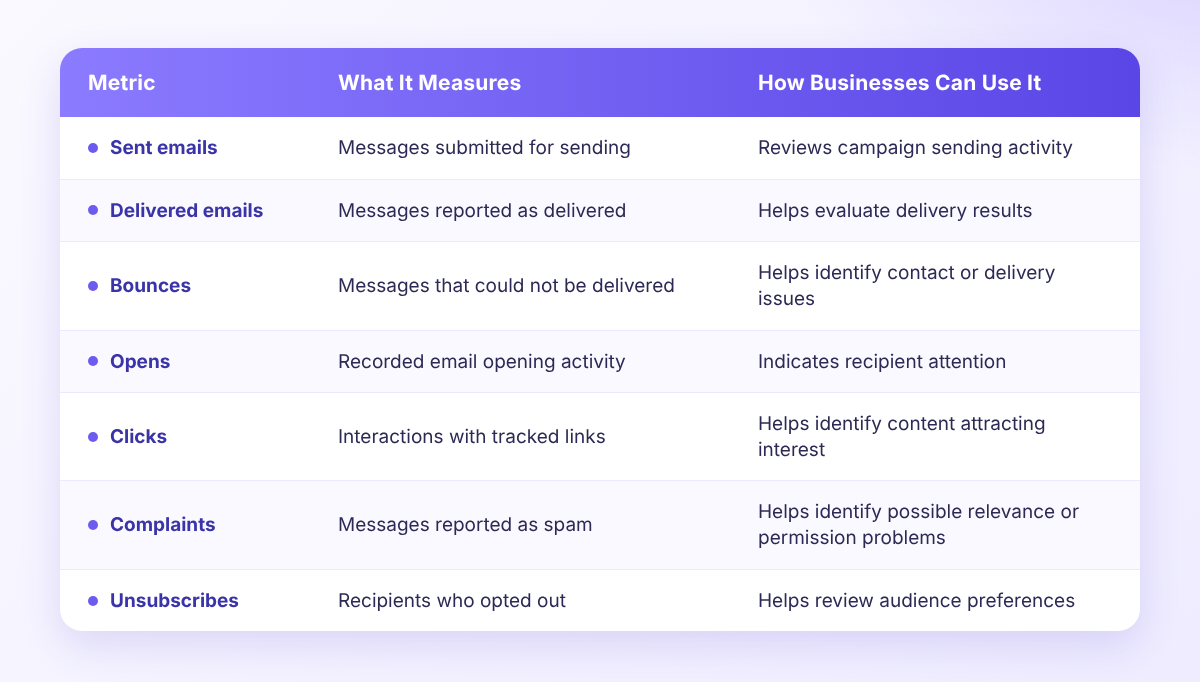
Businesses should not depend on only one metric when evaluating campaign performance. For example, a high open rate does not necessarily mean that a campaign generated meaningful engagement or business results. It is better to consider several relevant metrics together and connect them with the campaign's original objective.
Collecting campaign data is only the first step. Businesses also need a clear process for using that information.
Before sending an email, decide what the campaign is intended to achieve. It may be designed to share company news, announce a product, encourage website visits, or provide useful information to subscribers. The objective helps determine which metrics should be reviewed afterwards.
Review campaign results regularly rather than making decisions based on one email. Look for repeated changes in clicks, bounces, complaints, and unsubscribes. Patterns across several campaigns can provide more useful insights than isolated results.
Businesses can experiment with subject lines, content formats, calls to action, and audience groups. Changing one important element at a time can make it easier to understand what influenced the results. Where available, A/B testing can help compare different versions of a campaign with suitable audience groups.
Campaign reports may reveal problems that are connected to contact quality. Businesses should review invalid addresses, respect unsubscribe requests, and maintain appropriate suppression records. Keeping contact information organised supports more responsible email communication.
Opens and clicks are useful indicators, but they do not always show whether a campaign achieved its business objective.
For example, an online store may need to understand whether an email campaign contributed to product page visits or purchases. This may require additional website analytics or conversion tracking. Combining email reports with relevant business information can provide a broader view of marketing performance.
Businesses looking for Email Marketing Software often need more than a tool for sending campaigns. They also need a way to organise contacts and review what happens after their messages are sent.
Sendr365 provides campaign management, contact and list management, and email event tracking to support business email communication. Its Metrics dashboard provides information about email activity, including sent emails, deliveries, opens, clicks, bounces, complaints, and unsubscribes. Businesses can use these details to review campaign performance and identify areas that may need attention.
Sendr365 also allows users to manage contacts and organise them into lists. This helps marketing teams select recipients when preparing campaigns for different audiences. Campaign creation and scheduling support organised email communication, while suppression management helps ensure that contacts who unsubscribe do not receive future marketing sends from the account.
For developers, Sendr365 also provides REST API integration. This allows websites and applications to connect with its email functionality and supports businesses that manage marketing communication alongside transactional messages. By bringing campaign management, contact organisation, and email event information together, Sendr365 gives businesses useful tools for managing their email communication and reviewing campaign activity.
Data plays an important role in modern email marketing. Businesses that review campaign results can better understand audience engagement, identify delivery problems, compare campaign performance, and plan future communication.
Email Marketing Software supports this process by bringing campaign management and performance information into one place. Features such as analytics, contact management, segmentation, scheduling, and suppression management can help marketing teams make more informed decisions.
However, collecting data is not enough. Businesses should understand what each metric measures, review results over time, and connect campaign performance with their actual marketing objectives. By using campaign information carefully, businesses can move away from guesswork and develop a more organised approach to email marketing.
It provides campaign reports and email activity information, such as deliveries, bounces, opens, clicks, complaints, and unsubscribes. Businesses can review these metrics to evaluate campaigns and plan improvements.
The most useful metrics depend on the campaign objective. Common metrics include delivery information, bounces, clicks, complaints, and unsubscribes. Recorded opens can also provide context, but they are affected by privacy features and tracking limitations.
Campaign analytics helps businesses understand how their emails perform. It can reveal delivery issues, recipient interactions, and patterns that may help improve future campaigns.
Yes. Contact management, segmentation, and campaign reporting can help businesses organise audiences and understand how subscribers respond to different messages. Teams can use these insights when planning future communication.
Businesses should review reports after important campaigns and examine results regularly to identify longer-term patterns. The review frequency depends on how often campaigns are sent and the business's communication goals.
Email delivery refers to whether a message was reported as delivered to the recipient's mailbox. Email engagement refers to recorded interactions, such as opens and clicks. A delivered email does not necessarily mean the recipient read or interacted with it.
Yes. Small businesses can use campaign reports to understand subscriber responses, identify delivery issues, and make better decisions about future newsletters and promotional communication.
Sendr365 provides a Metrics dashboard with email event information, including sends, deliveries, opens, clicks, bounces, complaints, and unsubscribes. This helps businesses review campaign activity from their platform.



Share this page with your family and friends.