


Site Tour with Test Users
Choose a test user to login and take a site tour.
Choose a test user to login and take a site tour.


17 minutes, 54 seconds
-6 Views 0 Comments 0 Likes 0 Reviews
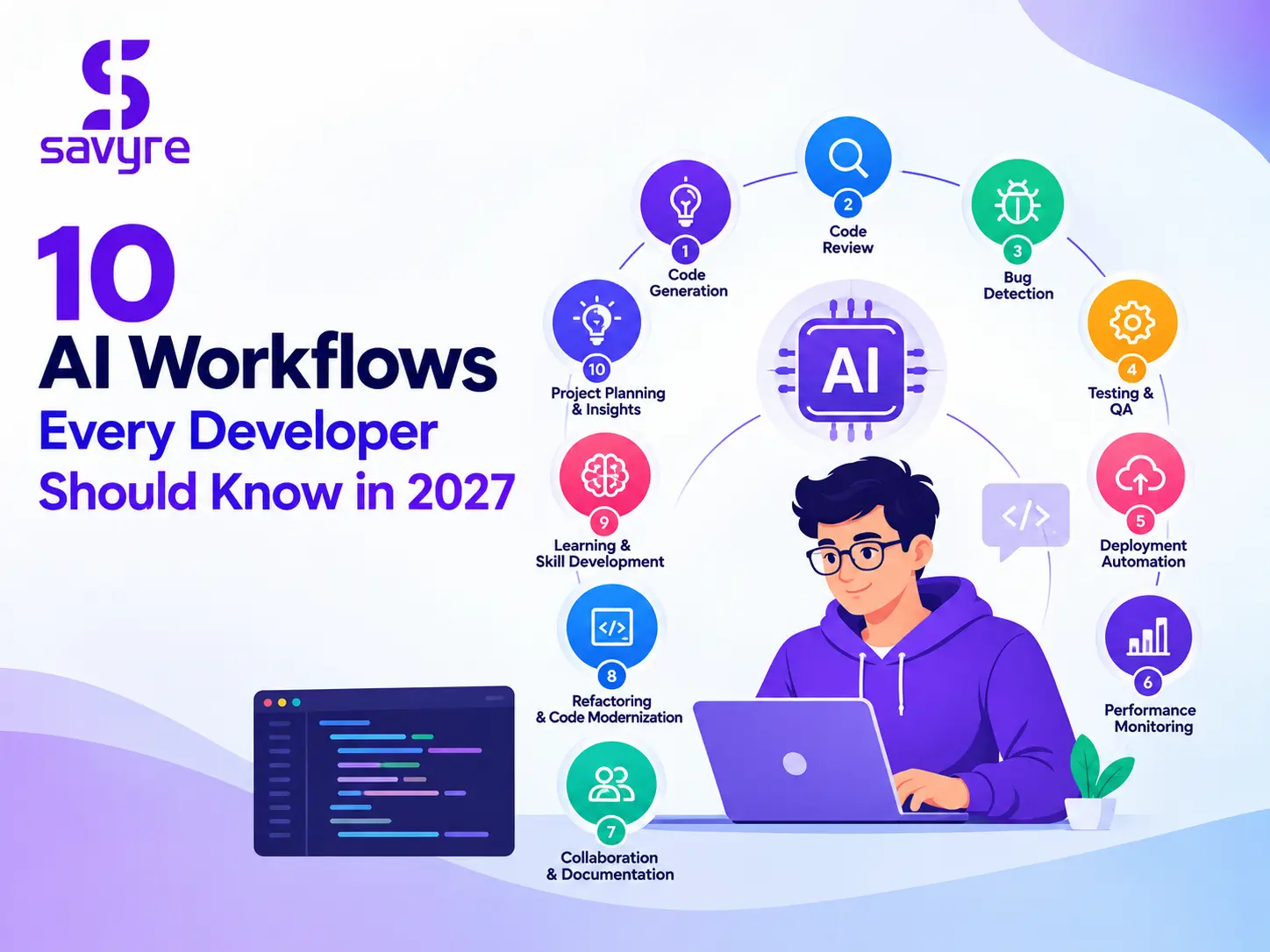
Artificial intelligence is transforming software development by helping developers write code, debug errors, automate testing, review implementations, and manage complex engineering tasks. Tools such as ChatGPT, GitHub Copilot, and Cursor enable developers to complete repetitive work faster while focusing on architecture, problem-solving, and code quality.
However, successful AI adoption requires more than using an AI coding assistant. Developers need a structured AI workflow for developers that combines AI-generated suggestions with human judgment, automated testing, and measurable engineering outcomes.
An effective workflow defines how AI tools receive context, perform tasks, validate results, and support software delivery. From code generation to autonomous agents, these ten workflows can help developers build reliable and maintainable applications.
An AI workflow for developers is a structured process that integrates artificial intelligence into software development activities such as planning, coding, debugging, testing, reviewing, and deployment.
Instead of treating AI as a standalone chatbot, developers incorporate it into their existing engineering tools and processes. This approach helps automate repetitive tasks, improve development efficiency, and maintain consistent quality standards.
For example, a developer can use Cursor to understand an existing codebase, generate an implementation, create tests, and review changes before committing them to a repository.
A well-designed workflow includes clear requirements, relevant project context, defined permissions, automated validation, and human oversight.
AI-assisted code generation helps developers convert requirements into working code with less manual effort. Developers describe a feature, provide relevant context, and ask an AI coding assistant to generate an initial implementation.
For example, when building a user registration feature, AI can suggest form validation, API endpoints, error handling, and database interactions.
The workflow typically involves defining requirements, generating code, reviewing the implementation, and running automated tests. Developers should provide the programming language, framework, coding conventions, and expected behavior to improve the quality of generated results.
AI-generated code still requires human review. Developers must verify correctness, security, maintainability, and compatibility before merging changes into the main codebase.
Debugging can consume significant development time, especially when errors involve multiple components. AI tools can analyze stack traces, error messages, logs, and code snippets to identify possible causes and recommend fixes.
A practical debugging workflow starts by reproducing the problem and collecting relevant evidence. Developers then provide the error details to an AI assistant, examine its proposed explanations, and test potential solutions.
For example, if an API returns unexpected results, AI can help investigate request parameters, authentication logic, database queries, or response handling.
Developers should verify the root cause instead of applying suggestions blindly. Testing the fix and checking related functionality helps prevent regressions and ensures the application behaves as expected.
AI-assisted code review helps developers identify potential defects, duplicated logic, readability problems, and security concerns before code reaches production.
In this workflow, developers provide a pull request or a set of code changes to an AI review tool. The tool examines the implementation and produces findings that developers can investigate before completing a human review.
A useful review process prioritizes correctness, maintainability, performance, security, and project-specific coding standards.
AI can accelerate initial reviews, but it cannot guarantee that every defect will be detected. Developers should validate findings, reject irrelevant recommendations, and retain human approval for important changes.
Automated testing verifies that software behaves according to its requirements. AI coding assistants can help generate unit tests, integration tests, edge cases, and test data based on existing code and feature specifications.
The workflow begins with identifying expected behavior. Developers ask AI to propose test cases, execute them using the project's test framework, and investigate failures.
For example, a payment feature may require tests for successful transactions, declined payments, invalid amounts, duplicate requests, and network failures.
Developers must ensure tests validate meaningful outcomes rather than merely confirming that the current implementation runs. Integrating these tests into continuous integration pipelines helps teams detect regressions consistently.
AI-assisted documentation helps developers create and maintain technical explanations, API references, setup guides, code comments, and onboarding materials.
The process starts with the source code, existing documentation, and relevant requirements. AI drafts or updates the content, and developers verify that the instructions match the actual implementation.
This workflow is particularly useful for documenting complex modules, explaining API behavior, and helping new developers understand a codebase.
However, generated documentation can become inaccurate when code changes or the AI misunderstands an implementation. Documentation should therefore be reviewed and updated alongside software changes.
Code refactoring improves software structure without changing its intended behavior. AI tools can identify duplicated code, complicated functions, inconsistent patterns, and opportunities to improve readability.
Developers begin by identifying a specific problem and asking AI to suggest a focused change. They then review the proposed implementation, run automated tests, and measure performance where optimization is involved.
For example, a large function handling validation, database access, and response formatting may be divided into smaller, more maintainable functions.
Smaller changes are easier to test, understand, and reverse. Developers should rely on profiling and measurable performance results rather than assuming that AI-generated optimizations will automatically improve an application.
Developers regularly encounter unfamiliar libraries, frameworks, APIs, and architectural patterns. AI assistants can explain technical concepts, compare implementation approaches, and generate examples based on specific requirements.
A structured research workflow involves defining the technical question, requesting an explanation, evaluating alternative approaches, and validating important details against official documentation.
For example, a developer learning a new database framework can ask AI to explain connection management, query patterns, transaction handling, and common errors.
This workflow can shorten the learning process, but developers should verify version-specific instructions, compatibility requirements, and security recommendations before applying them to production systems.
Continuous integration and continuous deployment pipelines automate software building, testing, and delivery. AI tools can assist with generating pipeline configurations, explaining build failures, and identifying opportunities to improve deployment processes.
The workflow starts with defining build requirements, test stages, environment variables, deployment targets, and approval rules. AI can propose a configuration that developers validate in a controlled environment.
For example, an AI assistant can help create a pipeline that installs dependencies, runs automated tests, builds an application, and prepares a deployment artifact.
Security remains essential. Teams should protect credentials, restrict permissions, require appropriate production approvals, and maintain rollback procedures. AI-generated scripts should never receive unrestricted production access without suitable safeguards.
An Agentic engineering workflow uses AI agents to execute connected engineering tasks with varying degrees of autonomy. Instead of responding only to individual prompts, an agent can interpret an objective, inspect a repository, plan changes, execute actions, run tests, and evaluate results.
An AI-native developer workflow moves you from writing every line of code to acting as an architect, planner, and quality gatekeeper while autonomous models and agents handle execution loops.
For example, a developer can assign an AI agent the task of implementing a new API feature. The agent may inspect relevant files, propose an implementation plan, modify code, run tests, and report its findings for review.
The developer establishes the technical direction, defines acceptance criteria, and verifies the final implementation. This creates a structured balance between autonomous execution and human accountability.
An effective agentic engineering workflow requires clear objectives, limited permissions, checkpoints, and measurable results. Teams should introduce autonomy gradually, beginning with tasks that are easy to inspect and validate.
AI-assisted security analysis helps developers understand vulnerabilities, investigate suspicious code patterns, review static-analysis findings, and prioritize remediation work.
A practical workflow combines established security tools with AI assistance. Developers run static application security testing, dependency scanning, and secret detection, then use AI to explain findings and suggest potential fixes.
For example, an AI assistant can explain why unsanitized input may create an injection vulnerability and recommend safer query-handling practices.
All proposed fixes must be validated through appropriate security tests and established scanning tools. Developers should also follow organizational policies for confidential source code and avoid sharing credentials or sensitive data with unapproved AI services.
Savyre provides an AI Coding Workflow designed to support structured AI-assisted software development through environments such as VS Code and Cursor.
Rather than treating AI-generated code as the only outcome, a structured development workflow can help teams examine the steps involved in planning, implementation, validation, and delivery.
Savyre's AI Coding Workflow supports a multi-stage process in which developers work through engineering tasks and capture workflow evidence. Exportable HTML and PDF reports can help teams review the development process and communicate findings.
This approach is useful for teams that want a more structured way to examine AI-assisted development rather than relying exclusively on the final code output.
To make the most of an AI coding workflow, engineering teams should define task requirements, establish validation criteria, review AI-generated changes, and maintain clear ownership of technical decisions.
AI workflows can improve software development when they are integrated into existing engineering practices.
Faster development: AI can generate initial implementations, explain unfamiliar code, and reduce repetitive manual tasks.
More consistent testing: AI-assisted test generation can help developers identify missing edge cases and expand test coverage.
Improved debugging: AI can help investigate errors and suggest potential causes, reducing the time spent exploring possible solutions.
Better documentation: AI can assist with technical explanations, API references, and onboarding materials.
Structured engineering processes: Defined workflows help teams establish repeatable steps for planning, implementation, testing, and review.
More controlled AI adoption: Clear permissions, validation requirements, and human oversight help teams use AI without giving up responsibility for software quality.
These benefits depend on the task, the quality of the available context, the capabilities of the tools, and the team's validation practices. AI should be evaluated using measurable outcomes rather than assumptions about productivity.
Developers can build an effective AI coding workflow by starting with a specific engineering problem and integrating AI into an existing process.
First, choose a practical task such as debugging, documentation, or test generation. Next, provide relevant context, define the expected result, and select an appropriate AI tool. Review the generated output and validate it with tests, code review, or other relevant checks.
As the process becomes reliable, connect related activities into a repeatable workflow. Teams can then measure development time, defect rates, test coverage, and review effort to understand the actual impact.
For more advanced workflows, developers can introduce AI agents to handle connected tasks under defined permissions and approval checkpoints. Savyre's AI Coding Workflow can support teams seeking a structured approach to AI-assisted development across VS Code and Cursor.
The objective is not to automate every engineering decision. It is to reduce repetitive effort while preserving technical judgment, accountability, and quality.
AI is changing how developers approach coding, debugging, testing, documentation, security, and software delivery. The most useful workflows combine AI capabilities with clear requirements, reliable validation, and human oversight.
By adopting a structured AI workflow for developers, engineering teams can make AI assistance more repeatable and effective. Start with a few high-value tasks, measure the results, and expand toward connected workflows as confidence grows.
For teams looking to structure AI-assisted software development, Savyre's AI Coding Workflow offers an approach to working across VS Code and Cursor while capturing evidence from development activities.
The best AI workflow depends on the task. Code generation, debugging, automated testing, code review, and documentation are useful starting points. Developers should choose workflows that solve specific problems and validate results before adopting them across a team.
Common tools include ChatGPT for technical explanations and debugging, GitHub Copilot for coding assistance, Cursor for AI-supported code editing, automated testing frameworks, and security-scanning tools. The right combination depends on the programming language, project requirements, and development environment.
An agentic engineering workflow allows AI agents to perform connected engineering tasks, such as inspecting code, planning changes, implementing features, and running tests. Developers define objectives and constraints while reviewing important decisions and validating results.
A traditional workflow often relies on developers manually completing most implementation steps with individual tools. An AI-native developer workflow integrates AI into planning, execution, validation, and delivery, allowing developers to focus more on architecture, coordination, and quality control.
Savyre's AI Coding Workflow supports structured AI-assisted development through VS Code and Cursor. It provides a multi-stage workflow approach and exportable HTML and PDF reports to help teams review development activities and their associated evidence.


Share this page with your family and friends.